Lifestyle Imagery Generation for DTC Brands Without a Photo Studio
AI lifestyle generation lets brands test product images as fast as they iterate ad copy.

The constraint that limits DTC performance marketing is the structural impossibility of testing creative variations at the speed the channel demands, not the line item for photography. Most brands shoot conservatively: one hero product shot and two or three lifestyle variations per SKU, because every new context, a new room, a new mood, a new season, requires booking a new shoot. That scarcity forces teams that cannot afford to test new visuals to pour their testing budget into copy instead, cycling through headlines and calls to action while the product image sits frozen in place. When an ad underperforms, the team has no lever to pull on the visual side. So the team waits for the next shoot cycle, weeks away, while the campaign keeps spending against an image nobody has had the chance to improve.
What AI lifestyle generation unlocks: creative volume
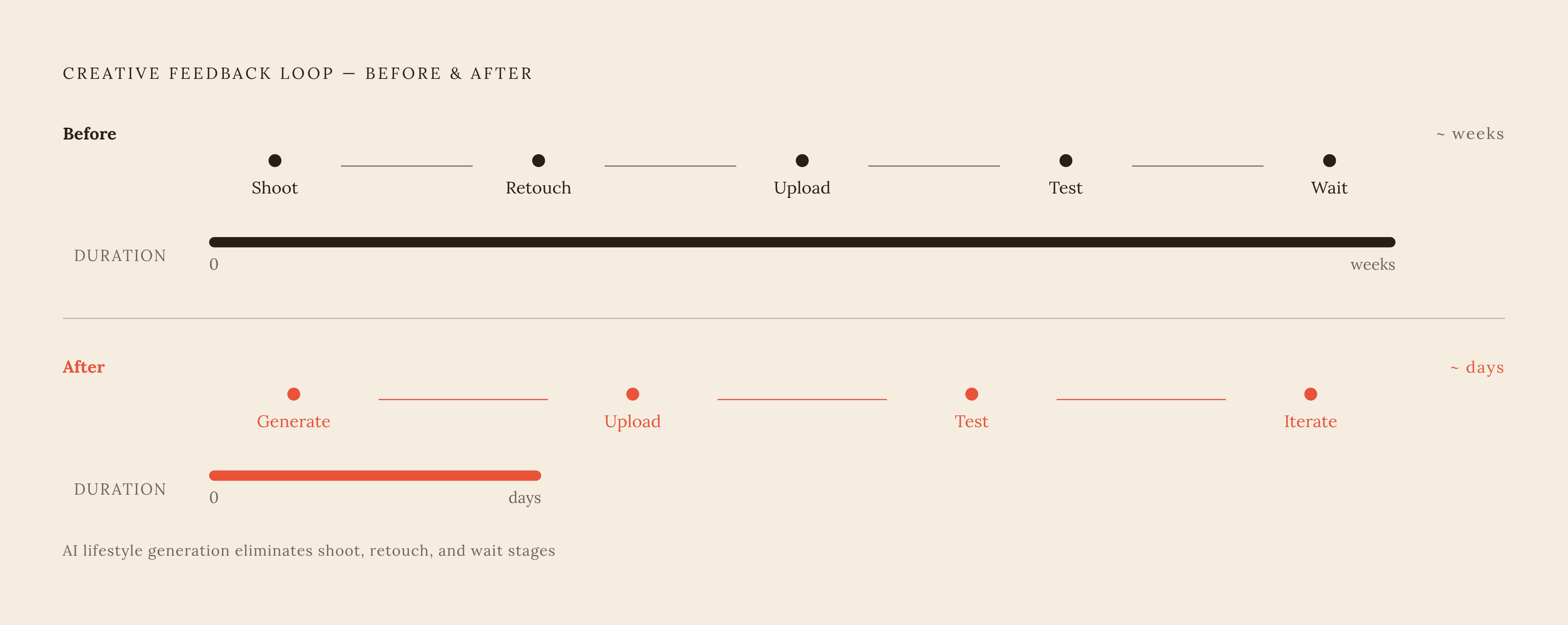
AI lifestyle generation does not primarily save money on photography. It changes what a product image is allowed to be: a variable that can be tested, iterated, and replaced as readily as ad copy already is. A skincare bottle can appear on a bathroom shelf, a gym bench, a train seat, or a home office desk, the same product rendered across dozens of lifestyle contexts, at close to zero marginal cost per additional scene. A location shoot for each of those settings would run into real money and real calendar time; generation collapses both. The operating model shifts accordingly: a brand can produce a large set of lifestyle variants in hours rather than wait weeks for a studio date, then route that set directly into a testing pipeline built for performance marketing, where ad sets increasingly demand multiple creative variants to test hooks, layouts, and visual angles against each other. The feedback loop that once ran shoot, retouch, upload, test, wait, stretching across weeks, compresses to a matter of days once imagery can be generated on demand. The volume only matters when there is a plan behind it. Generating images is not the same as having a visual content strategy, and the brands that capture this unlock treat generation as a system built for repeat use, not a one-off trick deployed for a single campaign. But volume without structure produces a flood of inconsistent assets, and that creates a problem the rest of this piece works through.
Where AI-generated lifestyle imagery works
AI lifestyle generation is production-ready for most categories a DTC brand sells in, but it fails predictably in a specific place: product fidelity under generation pressure. Fine jewelry and luxury watches push past what current generation handles reliably, because intricate detail and reflective surfaces are exactly where models tend to improvise. High-end eyewear runs into the same issue through lens clarity, and any product where material texture is the primary value signal, a woven fabric, a brushed metal finish, a specific leather grain, carries real risk of looking subtly wrong in ways a buyer notices even without being able to name the problem. The failure mode that matters most is truth to the product: a hallucinated button, a warped logo, an incorrect proportion, or a wrong texture can undermine conversion even when the generated scene is beautiful to look at, because the customer is evaluating whether the thing in the photo is the thing they would receive. This is the exact problem a feature like ProductShot AI's Product Lock is built to address, locking logo, shape, labels, packaging, color, and material in place while the environment around the product gets rebuilt. Lighting consistency is the other marker to watch, because when shadow direction, intensity, or color temperature do not match between the product and its new background, viewers register that something is off even when they cannot articulate what. Knowing where these failure modes sit is what makes the tool usable at scale, because it tells a team exactly which categories and which assets need a human check before anything ships.
The hybrid workflow: where AI handles volume and photography handles brand-critical assets
The most effective DTC teams redesign the pipeline so that AI absorbs the high-volume, iteration-heavy work while professional photography stays anchored to the assets where it is irreplaceable. Professional photography holds its ground for hero product shots, for luxury-category imagery, and for any asset where material or texture fidelity is itself the selling point, the exact categories named above as generation's weak spots. AI generation takes on everything built for volume and iteration: lifestyle variations, contextual and seasonal shots, ad creative variants, background tests, and the channel-specific resizes that used to eat hours of a designer's week. This division is a deliberate allocation of labor: stop using photography for tasks AI performs faster with no loss in quality, and reserve the shoot budget for the handful of assets that actually require it. The operational payoff is concrete. A single marketer can now run studio-quality visuals across an entire content pipeline, with hero shots captured once and lifestyle or ad variants generated continuously from that foundation. Email and retargeting benefit in a particularly direct way: monthly refreshes of headers, product carousels, and retargeting banners keep click-through rates from decaying over time, without rebooking a shoot every time a campaign needs a new look.
The tool landscape as of 2026: what each platform is built for
The tool market has sorted itself into functional tiers, and matching a workflow to the wrong tier creates friction that erases the velocity gain AI was supposed to deliver. Treating this as a single category of interchangeable "AI image generators" is the fastest way to end up frustrated with a tool that was simply built for a different job.
Production systems and enterprise workflows sit at one end of the market, built around APIs, volume paths, governance, and managed pipelines rather than a single marketer clicking through a web interface. Bria AI fits here: it targets product and engineering teams that need commercially safer visual-generation infrastructure built on licensed training data. It offers product-shot APIs, integration with PIM and DAM systems, custom capacity, and deployment on-premises or in a private cloud, with pricing available after a free-generation tier, aimed at teams building generation into a larger software stack.
Creative systems for maintaining a repeatable brand style occupy the next tier, built around reusable visual direction across SKUs and campaigns. Kive stores products, visual references, and brand direction so an approved creative system can be reused across campaigns, with saved products, Studios, brand-style training, asset management, and team workspaces available on paid plans. Nightjar is built specifically for catalog consistency, applying one approved photography direction across recurring products and collections through reusable Products and Recipes, with batch generation, a shared library, Shopify integration, and API access on paid plans. Nightjar earns its place when the priority is identical angles, lighting, and color across an entire catalog, and it is typically paired with another tool when a brand also needs richer, more varied lifestyle scenes.
Flair AI belongs in this same tier but with a different interface philosophy: it is structured like a collaborative design studio, with a drag-and-drop canvas for prompt-driven control over scene composition and prop placement. It works well for branded lifestyle photography where precise product placement matters, fitting creative and brand teams who want a design-tool feel paired with brand kits.
ProductShot AI positions itself as an AI photo studio built specifically for ecommerce, and its Product Lock feature preserves logo, shape, labels, packaging, color, material, and proportions while the environment around the product is rebuilt. It ships with quick scene templates covering common ecommerce and lifestyle backdrops and lens-language presets spanning standard, close-up, macro, documentary, wide, and other framing styles that let a team get repeatable composition without writing a prompt each time. Marketplace presets for Amazon, Shopify, and Etsy, reference-image inputs for brand mood, before/after comparison, and reusable image history round out the feature set. Pricing as of June 2026 includes one-time packs, with paid tiers adding commercial usage rights, HD export, and priority support; it is web-only with no mobile app, and some modules, including batch processing, are still rolling out.
Self-serve, template-driven tools make up the last tier, built for smaller brands that want better images without a complex workflow sitting behind them. Pippit AI connects product imagery with ads, short-form video, publishing, and social-commerce workflows, offering batch product photos, image and video creation, a product library, and publishing and analytics tools, with a free plan available alongside annual paid plans. Avocado AI takes a different approach within the same tier: it functions as a multi-model workspace that gives access to several image models in one place, priced from EUR 19.99 to 249 per month on a credit basis with no free tier.
Choosing among these tiers is a matter of matching the job to be done: infrastructure and governance call for Bria AI, catalog-wide consistency calls for Nightjar, precise lifestyle composition calls for Flair AI or ProductShot AI, and fast, low-friction output for a smaller team calls for Pippit AI or Avocado AI.
Prompt engineering as a consistency strategy at scale
Having the right tool does not solve brand consistency on its own, and the gap between those two things is where most scaling teams lose control of their visual identity. A prompt is a single conversation. It expires when the chat window closes, it does not travel to the next team member or the next platform, and it cannot enforce anything across a team or a campaign cycle on its own. Prompt engineering is a skill that lives in the person who wrote the prompt, not a standard the rest of the team can rely on, so output quality rises and falls with whoever happens to be generating that day. Brand consistency has always been a systems problem, long before generative tools entered the picture, and AI does not change that. But it raises the cost of never having solved it, because every additional generation, every additional platform, and every additional team member now using these tools multiplies the chances of drifting away from a coherent visual identity. The instinct to fix this with better prompts, a shared document of good phrasings, a prompt library passed between teammates, recreates the exact problem it is meant to solve: expertise that lives in one person's head rather than in a structure anyone on the team can use. The brands that keep their identity intact at scale build a system for visual content, treating prompts as one component within it.
Building a machine-readable brand kit that generative tools can consume
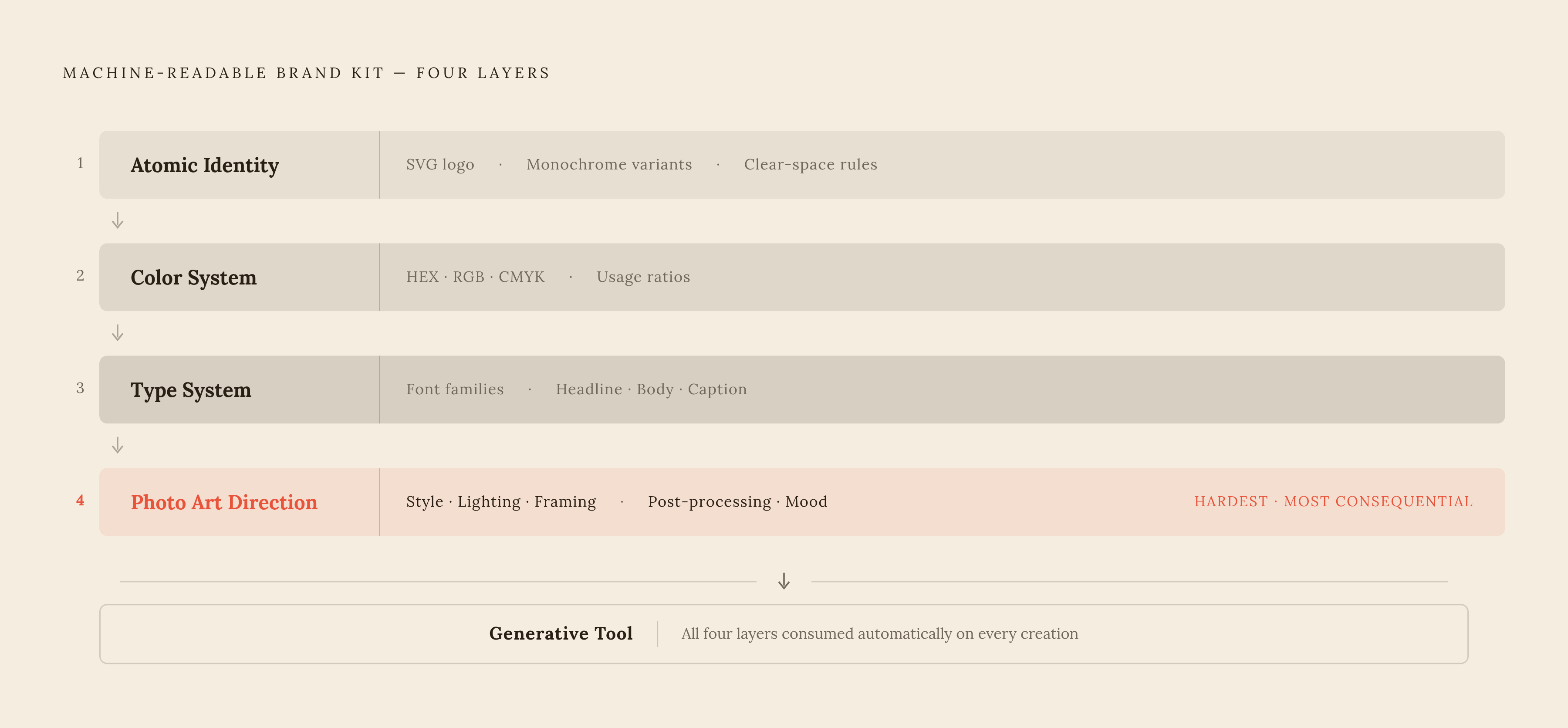
The unit that actually holds visual consistency together at AI scale is a structured, machine-readable brand kit, not a prompt library passed around in a team chat channel and not a PDF style guide sitting in a shared drive that nobody opens during production. The distinction between the old brand book and the new brand kit is a distinction in who, or what, actually reads it: a traditional brand book is a document built for human reference that rarely gets opened in the middle of a production sprint, while an AI brand kit is a structured library that a generative tool consumes automatically on every single creation, with no one needing to remember to check it. Built correctly, that kit carries four layers of information. Atomic identity covers the logo itself, stored as an SVG along with its monochrome variants and the clear space rules that keep it from being cropped or crowded incorrectly. A color system defines primaries and secondaries not as a loose description like "blue palette" but as specific HEX, RGB, and CMYK values paired with usage ratios that tell a generation tool how much of each color should appear and where. A type system sets out font families and a clear size hierarchy, so headline, body, and caption treatments stay distinguishable across every asset a team produces. Photo art direction closes the kit, specifying style, lighting, framing, post-processing choices, and mood references that give a generative tool the same visual instincts a brand's own photographer would bring to a shoot. A kit built to that anatomy is what lets a team generate at volume without each new asset becoming its own negotiation over what the brand is supposed to look like.